Part 1 covered the consumption side: connect the MCP server, ask a question, read what comes back. That’s the easy half. A retrieval tool is only as good as the thing it retrieves, and the interesting question isn’t how to query a library — it’s what makes one worth querying.
So this is the part I skipped. What’s actually in 442 files, who decided any of it, and where it’s weakest.
The distribution is lopsided, and that tells you something
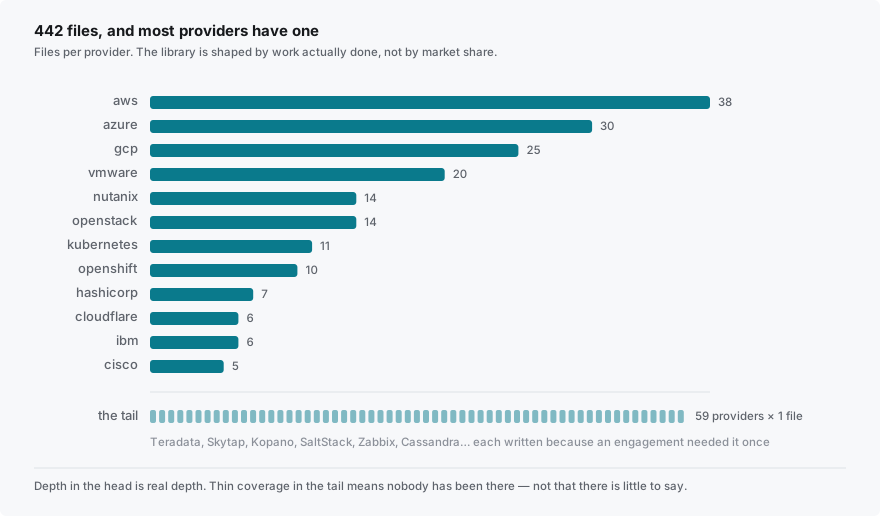
Providers are 280 of the 442 files. You’d expect the big three to dominate, and they do — AWS 38, Azure 30, GCP 25, so 93 files across a third of the provider tree.
Then it gets more interesting. VMware has 20 files, Nutanix 14, OpenStack 14, Kubernetes 11, OpenShift 10. That’s a lot of weight on the private-cloud and hypervisor side for a “cloud” library, and it’s there because that’s where migration work actually is right now.
And then there’s a long tail of roughly sixty providers with exactly one file each: Teradata, Skytap, Kopano, SaltStack, Zabbix, Cassandra, two different hosted email products. Nobody sits down to write a knowledge base and decides Kopano deserves a file. Those exist because an engagement needed one, once, and somebody wrote down what they learned rather than letting it evaporate.
That’s the honest description of how the library got written: it’s shaped by work actually done, not by market share. Which is its strength — the VMware and Nutanix depth is real depth, not a summary of vendor documentation — and also its bias. If your problem is in the fat part of the curve you’ll get a lot. If it’s somewhere nobody has been, you’ll get a stub or nothing, and you should assume that rather than read thin coverage as “there isn’t much to say here.”
What a file actually looks like
More useful to show the shape than to describe it. Every file follows the same structure, and each part is doing a job:
Scope — what the file covers, and explicitly what it doesn’t, with pointers. From the cost failures file:
Does not cover cost architecture and FinOps governance (see
general/cost.md,general/finops.md) or specific cloud pricing models (see provider-specific files).
That “does not cover” line is the mechanism that keeps 442 files from turning into 442 overlapping files. It’s the boring part and it’s the one that matters most at this size.
Checklist — priority-tagged items, each in the same three-beat form:
[Critical] NAT Gateway data processing charges. Goes wrong: a workload in a private subnet pulls 10 TB/month through a NAT Gateway. NAT charges $0.045/hour plus $0.045/GB processed. The hourly fee is small; the data processing fee is 10 TB × $0.045 = $450/month per NAT, multiplied across the AZs and accounts where this happens. Happens because: NAT Gateway is the obvious answer for “private subnet needs to reach the internet” and nobody runs the math until the bill shows up. Prevent by: use VPC Gateway Endpoints for S3 and DynamoDB (free, no data processing charge); model the NAT data volume at design time.
Why This Matters — the framing that the checklist items don’t carry individually. The cost file’s version is the sharpest sentence in it:
The audit posture of “we have a cloud cost management tool” is the tooling. The operational posture of “engineers consider cost when they design systems” is a culture. The two are very different things, and the second is much harder to achieve.
Common Failure Combinations — the part I’d steal for anything else I wrote. Individual failures are mostly survivable; the expensive ones are compounds:
No tagging + broad permissions + cost-unbounded resources = the runaway spend that nobody can attribute and nobody can stop
Egress storm + no budget alert + monthly billing cycle = the bill that arrives 27 days after the underlying problem started
A checklist gives you items. That block gives you the shape of an actual bad day, which is a different and better thing to have in your head going into a design review.
See Also — cross-references, which is what makes the “does not cover” discipline survivable.
Who decides something is Critical
The honest answer is: a person did, one item at a time, and the definitions are working ones rather than a rubric.
The way I use them: Critical means the engagement is damaged if you miss it — data loss, a failed cutover, a compliance finding, a bill nobody budgeted. Recommended means you’ll wish you’d done it, but you’ll recover. Optional means it’s worth knowing and most projects won’t need it.
The failure mode here is priority inflation, and it’s not hypothetical. That cost file runs eight Critical, three Recommended, one Optional. Is “forgotten dev/staging resources running 24/7” really the same tier as “your migration silently loses data”? Probably not. When everything is Critical, the filter that makes priority_filter: "critical" useful stops filtering, and you’re back to reading the whole file.
I’d rather say that plainly than pretend the taxonomy is cleaner than it is. If you use the filter, use it as a first pass and not as a verdict.
Rot
A curated library is a claim about how the world works, and providers ship continuously. Some of what’s in there will quietly stop being true, and there is no lane that re-verifies 442 files. That’s real debt and I’d rather name it than let you find it.
Three things make it less bad than it sounds.
The first is that the durable claims outnumber the perishable ones. A NAT Gateway price will change. “Nobody runs the math until the bill shows up” will not. The failure patterns, the happens because clauses, the combinations — those outlive product versions, and they’re the majority of the value.
The second is that the Scope block localizes staleness. When a file says what it does and doesn’t cover, a stale claim is contained to one file rather than smeared across the library.
The third is that a correction has somewhere to go, because the cross-references make the neighbors findable. That’s a maintenance property, not a user-facing feature, and it’s the reason the See Also blocks earn their space.
None of that makes the library current. It makes it correctable, which is the realistic goal.
But correctable only means anything if corrections actually arrive, and I am one person who cannot have worked in every provider in that tree. So: if you hit a gap, or something that used to be true and isn’t, open an issue on the architect repo. A missing file, a price that moved, a limitation that got lifted in a release, a failure mode you’ve watched happen that isn’t written down — all of it is useful, and the last one is the most useful.
That isn’t a courtesy request. A curated library with no inbound corrections decays into a snapshot of one person’s experience on the date they stopped paying attention. The long tail in the first section exists because somebody hit something once and wrote it down. That’s the only mechanism there is.
Why failures is organized by how things break
Eleven files: compliance, cost, data, dependencies, deployment, identity, networking, observability, operations, scaling, security. Not by provider, not by product, not by phase.
That’s a deliberate choice and it’s the one I’d defend hardest. Product-organized knowledge answers “how does this thing work,” which is what documentation is already for and what a general model is already decent at. Failure-organized knowledge answers “what goes wrong here,” and the answer usually isn’t product-specific — the retry loop that hammers a paid API is the same failure whether the API is Stripe or Twilio, and the runbook that requires access the on-call doesn’t have is the same failure in every organization that has ever had a runbook.
Organizing by failure mode also means the file survives the product. A file called providers/some-vendor/thing.md decays when the vendor renames the thing. A file called failures/cost.md doesn’t.
What I’d tell you to take from this
If you’re building something similar — for your own domain, not this one — the parts that turned out to matter weren’t the retrieval or the packaging. They were: write down what you learned on the job rather than what you think a knowledge base should contain; make every file declare what it doesn’t cover; give failures the same status as capabilities; and be specific enough to be wrong.
That last one is the real bar. A checklist item that says “consider cost implications” is safe and useless. One that says $0.045 per gigabyte and 10 terabytes and $450 a month can be checked, argued with, and corrected when the price changes. Most knowledge bases fail by being too safe to be wrong, and a library that can’t be wrong can’t be useful either.
That’s the library itself. In Part 3 → I get to the part that isn’t retrieval: turning it into artifacts somebody has to act on — decision records the library tells you when to write, design reviews as gap analyses, and cutover runbooks where the failure modes become preconditions.