Part 1 covered the idea and Part 2 covered what I added when the simple version started to strain. I ended Part 2 saying Part 3 was deliberately open, and that the interesting parts were still ahead: more than one vault, more than one person, running it somewhere other than your own machine.
This is the first move toward that last one. The agent now runs in a Linux container; the vault stays in Obsidian on the Mac; they talk over HTTP.
The honest reason I did it is basic security.
What an agent can reach when it runs natively
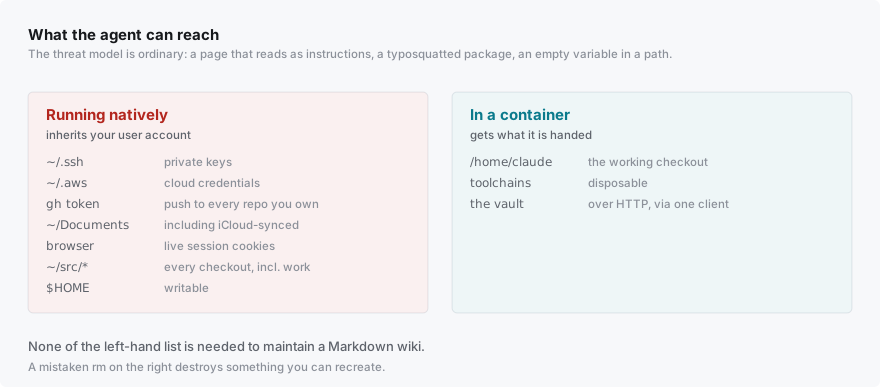
An agentic coding tool runs commands. That’s the entire value proposition — it isn’t useful if it can only suggest. But when it runs natively on a laptop, it inherits your user account, and it’s worth being concrete about what that includes.
Your SSH private keys. Cloud credentials in ~/.aws and ~/.config. A GitHub token with push rights to everything you own. Whatever is in your Documents folder, including the parts synced to iCloud or Dropbox. Browser profiles with session cookies. Every other repo you have checked out, including work ones. Your entire home directory, writable.
None of that is needed to maintain a Markdown wiki. But a process running as you has all of it by default, and “by default” is doing a lot of work in that sentence.
The threat model is mundane
The reason to care isn’t a rogue AI. It’s much more boring than that, which is exactly why it matters.
The agent reads a web page and the page contains text engineered to look like instructions. It installs a package that turns out to be typosquatted. It runs a setup script from a project whose README it just read. Or it simply gets something wrong: constructs a path from a variable that’s empty, and the command that was supposed to clean a build directory now has a much larger target.
That last one has already happened to me. A cleanup loop went past me with an rm in it that would have deleted more than it should have. I caught it and said no — which is the system working, but it works because I was reading carefully at that moment, and I am not always going to be. Approving hundreds of commands is exactly the activity where attention degrades.
Nothing on that list requires anybody to be adversarial. They’re ordinary failure modes of a tool that generates commands from text it read somewhere. Which is what “basic security” means here: not defending against a determined attacker, just declining to bet your SSH keys on every command being right.
The container is the boundary
Inside a container the agent gets a Linux userland, a working directory, and whatever you deliberately hand it. It cannot see your home directory. It cannot read keys you didn’t put there. A mistaken rm destroys a container you can recreate.
That’s the whole argument, and it would be enough on its own.
The second reason: your laptop stops accumulating
The thing nobody warns you about is how much an agentic setup installs.
Mine has pulled in a CAD kernel, several Node versions, a large amount of Python, a handful of CLI tools, and at least one thing I have no memory of approving. None of it was wrong — I asked for the work that needed it. But it’s sediment, it lands in your actual development environment, and it never leaves. A year of that is a machine you can’t reason about any more.
In a container it’s all disposable. The CAD stack alone is about 1.6 GB and lives in a virtualenv I could delete tomorrow without a thought.
What that changes is subtler than disk space. When the blast radius was my laptop, I declined things — new toolchains especially — on the grounds that I didn’t want them on my machine permanently. That hesitation is friction on the main loop, and the main loop is the point. Now the answer can be yes cheaply, and I say yes to experiments I would previously have talked myself out of.
The two reasons turn out to be the same property seen from either side: bounding what a mistake can reach is also what makes it affordable to stop worrying about mistakes.
The vault stays on the host, and that’s the point
The obvious move when containerizing would be to mount the vault so the agent can read and write files directly. Don’t.
The vault lives on the Mac inside Obsidian, exposed through Obsidian’s Local REST API plugin. Every read, every write, every search crosses that boundary as HTTP. The agent’s entire interface to my knowledge base is a thin client I can read in one sitting.
That’s worth more than the convenience of a mount, because it means there is exactly one path in — so any rule I want enforced has one place to live. Part 1’s immutability rule, where new raw files are always allowed but overwriting an existing one is blocked, is enforced in that client. If the vault were a mounted directory, that rule would be a convention I hoped the agent would follow. Instead it’s a wall.
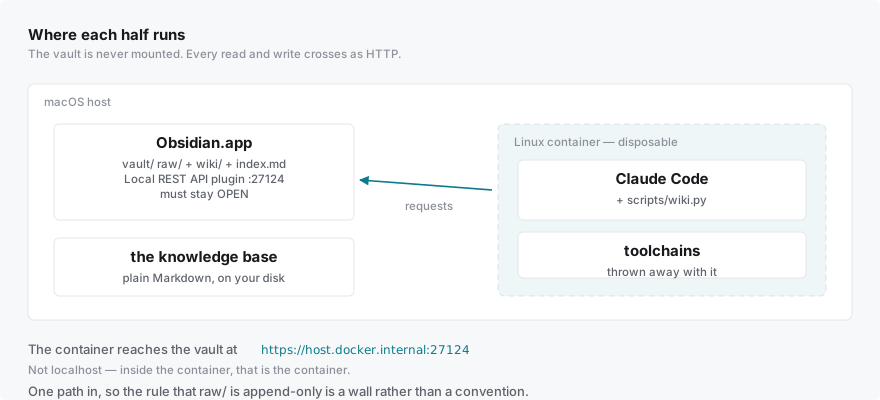
One gotcha, and it’s the most common reason this setup fails to come up at all: inside a container, localhost is the container. The host is host.docker.internal.
Where I punched a hole in it, and why you might not
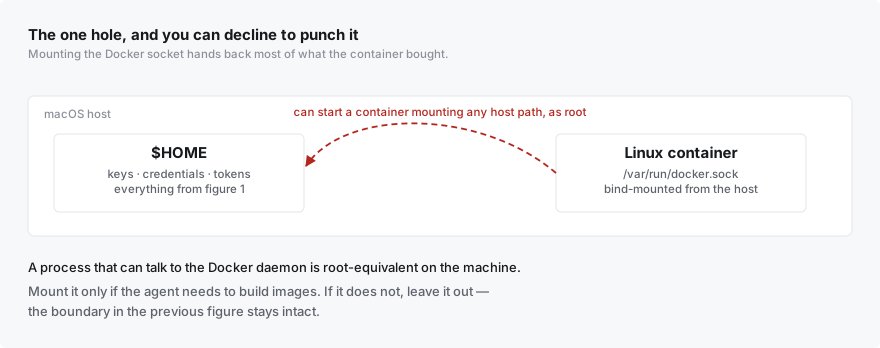
I mount the Docker socket into my container, because I want the agent to build and run images for other projects.
That gives most of the protection back. Anything that can talk to the Docker daemon can start a new container mounting any path on the host with any privileges it likes — so a process with the socket is root-equivalent on the machine, container or not.
I’m making that trade deliberately, on a single-user laptop, for an agent I’ve already trusted with a GitHub token. But it is a trade, and it’s the one part of this setup I’d tell you to think about rather than copy. If you don’t need to build images, don’t mount it, and the boundary stays intact. The security argument above is about the container; the socket is a hole you can decline to punch.
Worth saying plainly rather than letting the word “container” do work it hasn’t earned.
What it costs
The REST hop means the vault isn’t a local filesystem, so some bulk operations are round trips.
The API key needs re-entering whenever I rebuild, which is the step that stops a rebuild being fully automatic.
And because the agent’s accumulated memory — corrections, preferences, things it learned the hard way — lives inside the container, it gets snapshotted into the vault on a cadence. That machinery exists only because of where the container boundary falls.
That last one had an unexpected payoff. Making the container disposable forced me to answer a question I’d otherwise have avoided forever: what in here is actually precious? Code is in git. The wiki was never at risk. The memory was the one thing living nowhere else. That’s a fifteen-minute recovery, written down, and I’d never have done it voluntarily — nobody does disaster recovery for a laptop until the laptop dies. Making something disposable is a good way to find out what you were quietly depending on.
Why this comes before the interesting part
Once the agent is a container that reaches its vault over HTTP, “run it somewhere other than my laptop” stops being a porting problem and becomes a scheduling one. The agent already doesn’t care what machine it’s on, and already can’t assume the vault is a local path. Both had to be true before anything else on that list was worth attempting.
Which is roughly the theme of the series: the useful moves have been about drawing a line in the right place and then letting it be load-bearing — a schema the agent has to satisfy, an interface it has to go through, an environment it can’t permanently change.
Part 4, if there is one, is what Part 2 was actually pointing at.